
AI coding
Claude Code
Claude Code is Anthropic’s agentic coding tool designed to help you ship software faster.
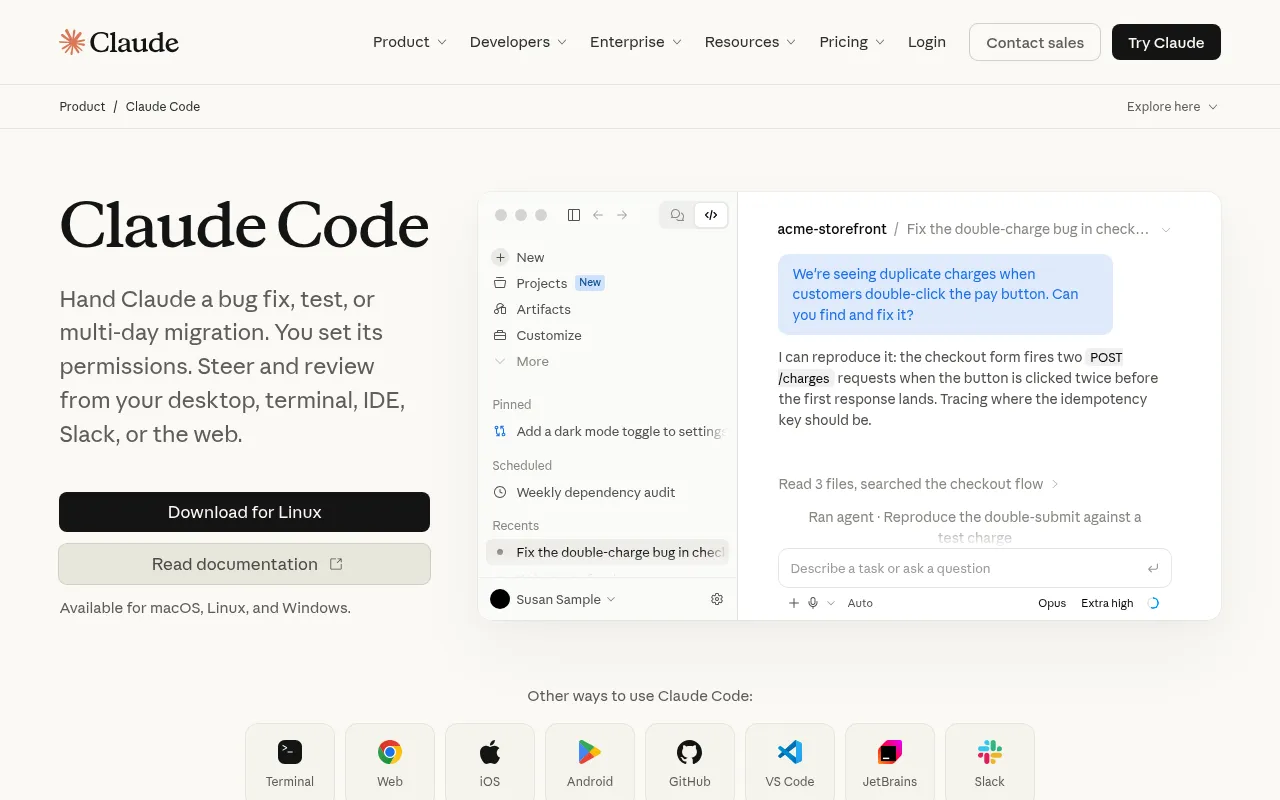
What is Claude Code?
Claude Code is Anthropic’s agentic coding tool designed to help you ship software faster.It understands your codebase, edits files, runs commands, and assists with tasks ranging from quick bug fixes to multi-day migrations.
Available for macOS, Linux, and Windows, Claude Code integrates seamlessly into your desktop, terminal, IDEs (such as VS Code and JetBrains), Slack, and the web.You set its permissions, allowing you to steer and review its work from your preferred environment.
The agent builds plans, asks clarifying questions, and handles work that can run for hours or days.Whether you are onboarding to a new codebase, triaging issues, or migrating legacy code, Claude Code acts as a capable pair programmer to accelerate your workflow.
Key features
- Cross-Platform IWorks on macOS, Linux, and Windows, with integrations for Terminal, VS Code, JetBrains, Slack, Web, iOS, and Android.
- Deep Codebase UnAnalyzes entire project structures to explain architecture and generate context-aware code modifications.
- Autonomous ExecuGoes beyond writing code by running commands, searching files, reproducing bugs, and verifying fixes directly.
- Long-Horizon TasBuilds detailed plans and handles complex engineering tasks that span hours or days, such as large-scale refactors.
- User-ControlledAllows you to set strict permissions, ensuring file edits and command executions happen within safe boundaries.
- Team CollaboratiIncludes Code Review to catch bugs before production and Projects to group and supervise multiple coding sessions.
How to use it
- Download the Claude Code client for macOS, Linux, or Windows from the official site, or install it via terminal using the provided curl command.
- Log in and authorize Claude Code to access your codebase within your preferred IDE (like VS Code or JetBrains) or terminal.
- Describe your task in natural language, such as 'Fix the double-charge bug in checkout' or 'Write tests for the payments module'.
- Review the plan, code edits, and command outputs generated by Claude Code, and approve them once verified.
- Use Projects to manage related coding sessions or leverage Code Review features to enhance code quality in team environments.
Where it fits
- Bug Fixing & DebQuickly locate and resolve production errors, such as reproducing race conditions or fixing frontend layout issues.
- Onboarding to NeHave Claude Code analyze unfamiliar project structures, core components, and architecture to accelerate developer onboarding.
- Code Migration &Handle time-consuming multi-day migration tasks, such as upgrading dependencies, refactoring legacy code, or adding new modules.
- Automated Test GAutomatically generate unit tests for existing modules to improve coverage and ensure safety during future modifications.
Pricing and free quota
Team plan is $20 per seat/month if billed annually, including up to $500 in pooled API credits; Enterprise pricing requires contacting sales.Individual pricing details are available on the official website.
Who it is for
- Software Engineers
- Full-Stack Developers
- Engineering Team Leads
- DevOps Engineers
FAQ
Which operating systems and editors does Claude Code support?
It supports macOS, Linux, and Windows, and integrates with VS Code, JetBrains IDEs, Terminal, Slack, and the Web.
Can Claude Code run commands automatically?
Yes, it can run commands to reproduce bugs or verify fixes, but users can set permissions to ensure safe execution.
What extra features come with the Team plan?
The Team plan includes self-serve seat management, up to $500 in pooled API credits, and collaboration features like Code Review.
How does it handle complex tasks that take days?
Claude Code builds plans and manages long-horizon tasks, allowing you to step in, review progress, and guide its next steps.